


Right now, your website is a tab people have to remember to open.
An app is an icon they tap without thinking, and a notification from that app brings them back much easier than any other channel your website has.
The gap between a website and an app is smaller than it looks. If you already have a mobile-friendly web UI, you might not realize how close you are to being able to launch a mobile app for your site.
This guide shows how to do it: what it takes to turn a website into an app, the different ways to get there, and how to choose the right one for your site.


What It Means to Turn a Website Into an App
“Turning a website into an app” covers a much wider range of projects than most people expect.
You could just look for the simplest possible way to allow users to load your site from their phone, independent from the browser. Or you could create a whole new version of your site, in a new, fully native codebase.
There’s a wide gap in what it takes to make your website into an app. To figure out the right way to do it, start by asking a few questions internally.
Do you want a companion app or a replacement?
Most businesses launch an app alongside their website, not instead of it.
Your website is probably still going to be the place most people go first: where people find you via search, for your marketing pages and for first-time visitors. The app serves a different purpose: where your regular customers, readers or members come back, more often and more easily.
Rarely, when you’re converting a website to an app, will you look to replace your website entirely, though there are cases where this makes sense, such as single-purpose tools, internal apps or businesses that are app-first by design.
Native, progressive web app or hybrid?
- A native app lives in the App Store and Google Play, sits on the home screen and sends push notifications through the phone’s operating system.
- A progressive web app (PWA) is a website built to behave more like an app. It can be added to the home screen and work offline, but it isn’t in the app stores.
- A hybrid app wraps web technology inside native code, so parts of the app are web pages and parts are native.
Each makes different trade-offs on features, discoverability and cost. We compare them in more depth in native, web and hybrid apps.
Rebuild your site, or extend it?
This is the biggest choice you’ll make, bigger than whether you build or buy, and bigger than the price.
Converting your site to an app often actually means rebuilding it as an app. That’s what happens with a lot of no-code app builders, as well as custom native builds. You’re getting a standalone app, built and managed independently from your website.
On the other hand, there are several ways to create an app that extend what you’ve already built, instead of building alongside it. Turning your site into a PWA is one (though you’re not getting a full-featured mobile app). Another is MobiLoud: our team designs, builds and maintains a custom app on the website and tech stack you already have. MobiLoud includes custom layouts for the phone, while your checkout, integrations and custom features keep working.
App builders and custom builds
Rebuilt as a second app
MobiLoud
Extended into an app
”Every time we had a promotion or had to change the design, or launch a new collection, we had to maintain two different sites, and we’re a small company. So the more time that we can save, the better.”
Why Turn Your Website Into an App?
Mobile is where people spend their time and money. Mobile devices accounted for 51.4% of US online spending in October 2025, according to Adobe, and people spent an average of 3.5 hours a day in apps in 2025.
A website in a phone’s browser is a weaker touchpoint than an app on the same phone, for the same customer.
The people who download your app are your best customers: the shopper who buys every month, the reader who checks your stories every morning, the member who logs in every day. An app gives them a faster, easier way back, and gives you a direct line to them with push notifications.
An app on someone’s home screen is also a signal that you’re an established brand worth coming back to.
What Every App Needs, However You Build It
A high-quality app that lasts needs the same four things, however you build it. Sometimes a vendor does that work for you, and sometimes it’s yours.
Knowing what’s involved makes the options easier to compare.
Native UI elements
Apps need things websites don’t have: a launch screen, a tab bar within reach of the thumb, navigation without a URL bar, and gestures that feel native.
None of that comes from your website automatically, even when most of the content inside the app does.
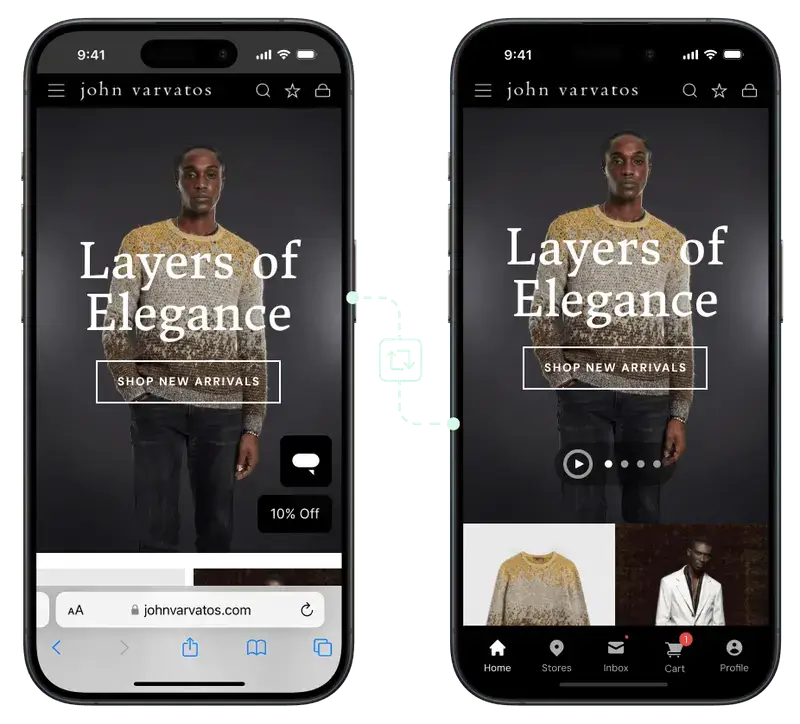
A good app adds a native layer to what your website already does. Navigation built for the phone and shortcuts for repeat customers turn a website into something people want to keep on their home screen.
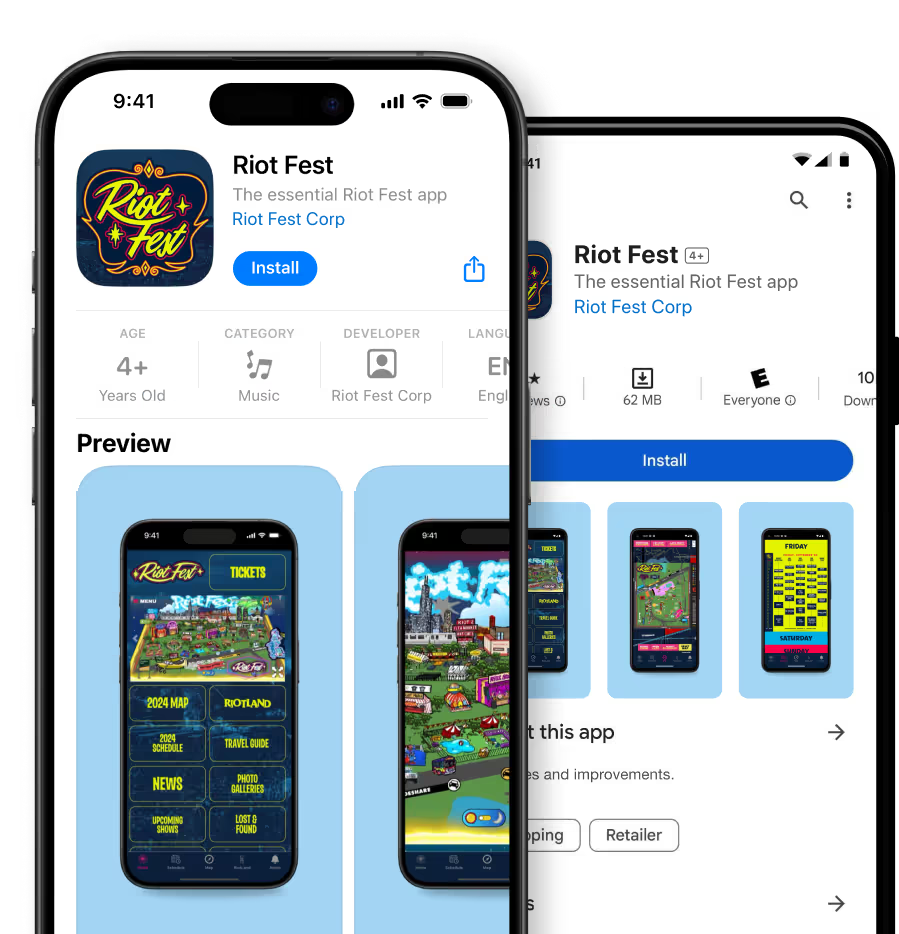
App Store approval
Getting into the Apple App Store and Google Play is one of the main reasons to build an app, and both review every app before it goes live.
Apple is the stricter of the two. App Store Review Guideline 4.2 rejects apps that don’t offer enough beyond a website, and 4.3 covers spam and copies, alongside rules on payments, privacy and age ratings.
You’ll also need developer accounts: $99 a year for Apple and a one-time $25 for Google Play.
Push notifications
For many businesses, push notifications are the single biggest reason to launch an app.
They land on the lock screen in real time, cost nothing per message, and don’t compete with a full inbox or a social media algorithm.
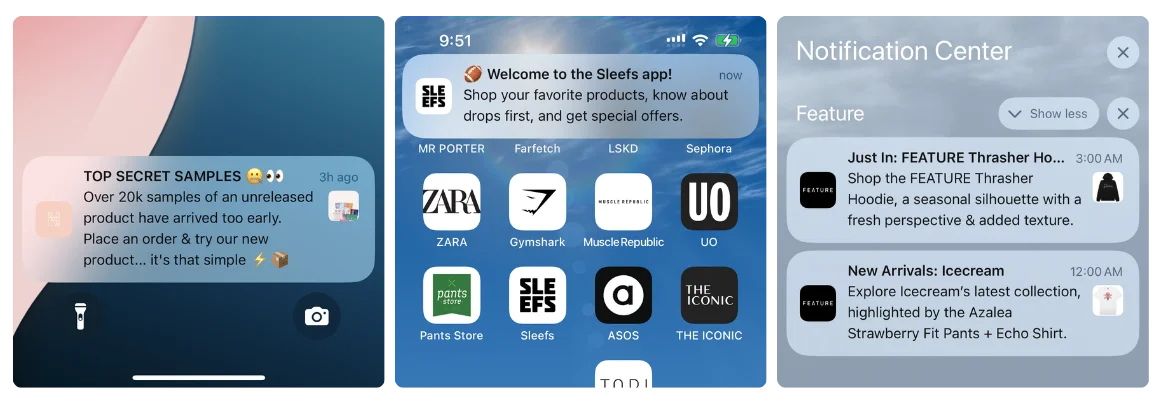
Push runs on Apple’s and Google’s infrastructure, usually through a service like OneSignal or Klaviyo, which lets you segment, schedule and automate your messages.
Ongoing maintenance
An app is never finished. Apple releases a major iOS version every September, Google updates Android through the year, and both keep tightening their rules and requirements.
Your website and the tools connected to it change too. An app that isn’t maintained eventually breaks, loses its users and collects bad reviews.
Six Ways to Turn a Website Into an App
Broadly speaking, there are six ways to go from website to app. The approaches range from DIY tools and your own developers to a managed service that does the work for you.
Each direction might give you a different type of app, affect certain features you’re able to bring into your app, and come with a different operating model (which most people don’t think about).
This table breaks them down:
| What you get | Progressive web app | Website-to-app converter | No-code app builder | Ecommerce app builder | Custom development | MobiLoud |
|---|---|---|---|---|---|---|
| In the App Store and Google Play | No Not on its own | Partly Apple often rejects basic wrappers | Yes | Yes | Yes | Yes |
| Push notifications on iPhone | Partly Only once added to the Home Screen | Yes | Yes | Yes | Yes | Yes |
| Everything your website already does | Yes | Yes | No Rebuilt from templates | Partly Catalog and checkout, not your custom features | No Rebuilt from scratch | Yes |
| Feels like a native app | Partly | Partly A website in a frame | Yes | Yes | Yes | Yes |
| One thing to keep up to date | Yes | Yes | No A second app | No A second storefront | No A second codebase | Yes |
| Who builds and runs it | Your developers | You | You | You, with the vendor’s support | Your developers or an agency | MobiLoud |
| Time to launch | Days to weeks | Hours to days | Weeks | A few weeks | 6 months or more | 2–4 weeks |
| Typical cost | Developer time | About $25–$125 a month | About $25–$300 a month | Anywhere from under $100 to several thousand a month | $40K–$250K+ to build, then upkeep | From $799 a month |
-
Progressive web app
- In the App Store and Google Play
- No Not on its own
- Push notifications on iPhone
- Partly Only once added to the Home Screen
- Everything your website already does
- Yes Yes
- Feels like a native app
- Partly Partly
- One thing to keep up to date
- Yes Yes
- Who builds and runs it
- Your developers
- Time to launch
- Days to weeks
- Typical cost
- Developer time
-
Website-to-app converter
- In the App Store and Google Play
- Partly Apple often rejects basic wrappers
- Push notifications on iPhone
- Yes Yes
- Everything your website already does
- Yes Yes
- Feels like a native app
- Partly A website in a frame
- One thing to keep up to date
- Yes Yes
- Who builds and runs it
- You
- Time to launch
- Hours to days
- Typical cost
- About $25–$125 a month
-
No-code app builder
- In the App Store and Google Play
- Yes Yes
- Push notifications on iPhone
- Yes Yes
- Everything your website already does
- No Rebuilt from templates
- Feels like a native app
- Yes Yes
- One thing to keep up to date
- No A second app
- Who builds and runs it
- You
- Time to launch
- Weeks
- Typical cost
- About $25–$300 a month
-
Ecommerce app builder
- In the App Store and Google Play
- Yes Yes
- Push notifications on iPhone
- Yes Yes
- Everything your website already does
- Partly Catalog and checkout, not your custom features
- Feels like a native app
- Yes Yes
- One thing to keep up to date
- No A second storefront
- Who builds and runs it
- You, with the vendor’s support
- Time to launch
- A few weeks
- Typical cost
- Anywhere from under $100 to several thousand a month
-
Custom development
- In the App Store and Google Play
- Yes Yes
- Push notifications on iPhone
- Yes Yes
- Everything your website already does
- No Rebuilt from scratch
- Feels like a native app
- Yes Yes
- One thing to keep up to date
- No A second codebase
- Who builds and runs it
- Your developers or an agency
- Time to launch
- 6 months or more
- Typical cost
- $40K–$250K+ to build, then upkeep
-
MobiLoud
- In the App Store and Google Play
- Yes Yes
- Push notifications on iPhone
- Yes Yes
- Everything your website already does
- Yes Yes
- Feels like a native app
- Yes Yes
- One thing to keep up to date
- Yes Yes
- Who builds and runs it
- MobiLoud
- Time to launch
- 2–4 weeks
- Typical cost
- From $799 a month
Progressive web apps (PWAs)
A progressive web app is a website built to feel more like an app. With a service worker and an app manifest, it can be added to the home screen, work offline and load faster than a typical mobile site.
It’s an extension of your existing website, built with the same frameworks and developers, so it’s one of the cheapest ways to give visitors something app-like.
The catch is that a PWA isn’t in the App Store or Google Play, few people know how to install one, and on iPhone it only gets push notifications once someone adds it to their Home Screen.
It’s the quickest route, and the most limited.
Website-to-app converters
Basic website-to-app converters such as Median, webtoapp.design and Appilix display your website in an app, ready to submit to the app stores. You enter your URL, pick an icon and a few settings, and get an app in hours.
They’re cheap, usually about $25 to $125 a month, and the app shows everything your website does, because it is your website.
The trade-off is the experience. A basic wrapper is your website with the browser bar taken away, and Apple often rejects apps like that under Guideline 4.2.
It’s also a DIY tool. If Apple sends the app back, or an iOS update breaks something, fixing it is up to you.
Converters suit simple sites and small budgets. We compare the main options in our roundup of website-to-app tools.
No-code app builders
No-code builders like Glide, Adalo, Bubble and Thunkable let you build an app from templates, drag-and-drop components and a database. There’s no coding needed, the learning curve is quick, and plans run from about $25 to a few hundred dollars a month.
They’re made for building standalone apps, not specifically for converting a website, though. So what you’re doing is creating a new version of your website with their no-code templates, and managing it as a standalone product separate from your site.
They work for simple content apps, or when the app replaces your website. For something that needs to be in sync with your website, the fit isn’t great.
No-code ecommerce app builders
For small online stores, ecommerce app builders like the dozens of options on the Shopify App Store are a better fit. They work like no-code builders, but connect to your store’s products, cart and checkout through the platform’s APIs.
That makes it much easier to keep your app and your website in sync, and at least ensure you’re not juggling two separate order and inventory systems.
The app is still a second storefront, though, assembled from the builder’s blocks, so custom features and many of your store’s apps don’t come with it.
That can feel limiting for bigger brands and for stores that aren’t on Shopify. For small and straightforward Shopify stores, they’re a quick and cost-effective way to launch.
Custom development
At the other end of the scale is custom development: an app written for mobile from scratch, with its own connections to your website’s data.
There are a few ways to do it:
- Fully native: separate apps in Swift for iOS and Kotlin for Android.
- Cross-platform: one codebase for both, with React Native or Flutter.
- Hybrid: frameworks like Ionic that mix web and native code.
Whichever you choose, it’s a big project. A custom app usually costs $40,000 to $250,000 or more and takes six months or longer, and then it needs developers to maintain it and keep it in sync with your website.
Custom development gives you the most control, at by far the highest cost.
MobiLoud
You manage one website codebase, and website changes appear in the app automatically.
Like a converter, it works from your website. Unlike a converter, it’s a full native app, with a team on hand to build, publish and maintain it for you, through every iOS and Android update.
A basic wrapperYour website in a box
MobiLoudYour website, with a native layer
MobiLoud is built for businesses with a successful website, who want to extend that experience into a native app: ecommerce brands on Shopify Plus, Salesforce Commerce Cloud or Adobe Commerce, as well as news publishers, online communities, marketplaces and web apps.
Apps built with MobiLoud include:
- Jack & Jones and the other BESTSELLER brands, with more than a million app downloads
- John Varvatos and Tadashi Shoji, luxury fashion labels on Salesforce Commerce Cloud and Adobe Commerce
- Pharmazone, an online pharmacy with 70,000 app users
It’s a more comprehensive (and as such, slightly more expensive) approach than a basic website-to-app tool, a no-code app builder or a PWA; but it’s the best all-round option to turn a relatively complex website into a true native mobile app.
Which Website to App Approach Is Right for Your Site?
The best way from website to app depends on the kind of site you run. Start with these four questions.
-
Do you need to be in the App Store and Google Play?
-
Should the app do what your website already does?
- No, something new Go to question 3
- Yes Go to question 4
-
Do you have developers and a six-figure budget?
-
Is it a small site or store, on a tight budget?
- Yes Converter or ecommerce app builder A builder suits a small Shopify store
- No, an established business MobiLoud A native app built on your website
Small or standard Shopify stores
If you run a Shopify store with up to about $1 to 2 million in annual revenue, a fairly standard setup and few theme customizations, one of the Shopify app builders is likely your best path.
There are close to a hundred mobile app builders in the Shopify App Store, covering everything from simple, budget mobile apps to custom enterprise-ready apps. The sweet spot for an app builder, however, is for relatively straightforward stores who are happy with what’s possible from a template-based tool.
Read more about building mobile apps for Shopify in our Shopify mobile app development guide.
Mid-market or enterprise ecommerce
Past the small-store stage, MobiLoud is the best way to launch an app.
That covers brands on Shopify Plus, BigCommerce, Magento and Adobe Commerce, Salesforce Commerce Cloud and custom or headless storefronts, and brands with several regions, B2B alongside DTC, or heavily customized sites.
At this size, app builders can’t carry over everything your store does, and custom development means a second codebase and six figures a year in costs.
”We tried a handful of different options in the market in terms of app builders, as well as reaching out to countless freelancers. Nothing out there provided us with the ease and accessibility that MobiLoud did to our team.”
Web-first businesses beyond ecommerce
If you run a publication, an online community or a SaaS product, your website is the product: the stories you publish, the forums and courses your members log in for, the tools your customers use every day.
An app turns occasional visitors into daily ones. It puts you on their home screen and gives you a direct line to them with push notifications, as search and social send fewer people your way.
The approach is the same as for a larger store: extend the website you already run, rather than rebuild it. MobiLoud builds news apps, community apps and apps from web products made with React, Next.js, Vue, Laravel and other frameworks.
Every story, thread and feature appears in the app as soon as it’s live on your site, and your team keeps working in the code and tools they know. A PWA can become a store-ready app the same way.
There are exceptions. A personal blog or small publication is usually fine with a PWA or a simple converter, and a community that runs entirely on a platform like Circle or Mighty Networks may be better off with that platform’s own branded app.
If your app needs to do something quite different from your web app, and it’s central to your business, a custom React Native or Flutter build is the way to go.
Marketplace or multi-vendor platform
If you run a marketplace, MobiLoud is likely the best option.
It builds your app on the same platform as your website, so buyers and sellers use the same accounts and features in one app, and everything that works on the web works in the app.
Ecommerce app builders rarely handle a marketplace’s complexity. Custom development is the alternative if you’re app-first and can fund a native team.
Small business, portfolio or brochure site
If your website isn’t central to how you make money, such as a local business, a portfolio or a brochure site, take the cheapest option that works.
A PWA gives visitors an installable, app-like site for very little. A converter or a no-code builder gets you into the App Store and Google Play for a small monthly fee, if a store listing matters for trust or discovery.
The Bottom Line on Converting Your Website to an App
For nearly any business, an app is one of the best ways to build loyalty and keep customers coming back.
The real choice is whether to rebuild your site as a separate app or extend the one you have, and how much of the work you want to take on yourself.
MobiLoud has helped businesses launch apps for more than ten years. If you run an established website and want a native app without rebuilding it, book a call and we’ll show you how it would work for your site, or start with a free preview.


